
Staff want tools that make work easier. When the approved path is unclear or slow, they may try AI on their own. Leaders can use that signal to learn where work needs help and build a better path.
Shadow AI means AI used for work outside the organization’s approved process. It may be a personal chatbot, a browser add-on, or an AI feature inside an existing app. The goal is to bring useful work into view, review it, and give staff clear ways to use approved tools.
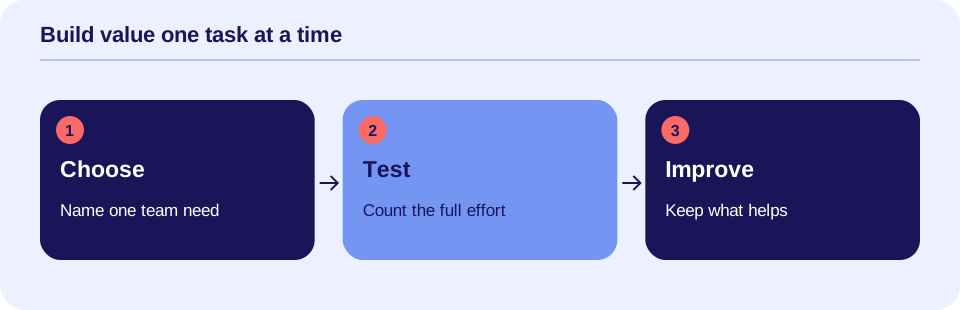
Make the approved path clear.

Look at the use, not just the product
Buying a product does not approve every feature in it. A team may approve a chatbot for public staff guides but not for care notes. Someone who starts sending client records through it has moved outside that scope, even if the product name is on an approved list.
AI can also be built into meeting tools, email apps, and document services. A new setting may start recording or processing information in a new way. Your review needs to cover the exact feature, account, task, and data.
Do not assume all unapproved use has the same impact. Drafting a public agenda differs from uploading an intake record. Check the facts before deciding what action is needed.
Find the need behind the shortcut
A staff member may be trying to finish notes before going home. A billing team may need help finding missing claim details. A manager may want to turn a long policy into a short guide. These are useful work needs to understand.
Invite staff to describe the task and what feels hard. Ask them to name tools and features through an approved channel. Do not ask for client records, screenshots, or full chat histories in a survey or ordinary email. Set a separate privacy process for any suspected data event.
Explain why you are asking: to make approved help easier to use and to protect care and data. Be clear about your organization’s rules. Do not promise that reporting will have no consequences unless that is an actual policy you can keep.
Build a simple use list
An inventory is a list of the tools and tasks in use. Keep it short enough to maintain. For each use, record the product and account, the feature, the task, the data types, the person in charge, and the approval status.
Include links to other systems and where results go. A draft copied into a health record or a claim has a different role from a private staff outline. Record what you know and mark what still needs review. An unknown answer is a reason to check, not proof that the service is safe or unsafe.
NIST’s AI Risk Management Framework supports clear roles and review across AI use. It is voluntary guidance, not a law or a product certification. The steps in this article are practical ways to apply those ideas to a care team.
Sort uses into clear paths
Use a small set of status labels so staff know what to do:
- Approved: The exact use has passed the needed review. Staff follow the stated data limits and review steps.
- Under review: The team is checking the use. State what may happen during review; do not leave staff to guess.
- Not approved: The use is not allowed. Give an approved way to finish the task and a route to request another option.
- Data event: Information may have gone somewhere outside approval. Send this to the privacy or security process right away.
These are suggested labels, not legal categories. Your team should define who can assign and change them. A manager’s informal “looks fine” should not stand in for the required care, privacy, or security review.
Review client data before use
For HIPAA-covered organizations, cloud services handling electronic protected health information on their behalf need a business associate agreement and other safeguards. A business associate agreement, or BAA, is a contract that sets duties for handling that data. HHS explains these requirements in its cloud guidance.
A BAA alone does not complete the review. Privacy, legal, and IT staff need to check the actual service, settings, access, storage, and rules that apply. Turning off AI training does not settle every use of the data.
Keep office and care tasks distinct, but protect data in both. Billing, scheduling, and staff messages can include client information. Use Can I Put Client Information Into an AI Tool? for a plain-language guide to the review. The existing data-handling worksheet helps record the data path.
Give staff workable choices.

Offer useful approved alternatives
A rule works better when staff have a practical way to finish the job. For a public staff guide, you might approve an AI draft with a source check. For care notes, you may need a service reviewed for that data and a clinician who checks each result.
Teach the specific task rather than saying “use AI responsibly.” Show which account to use, what data is allowed, who reviews the result, and how to report a problem. Give staff time for those checks.
Keep the request path easy to find. Name a reviewer and a realistic response time. Track requests that are waiting. If a decision takes longer, tell the team what to do in the meantime. A clear pause with a workable alternative is better than an unanswered request.
A made-up example
A clinic learns that billing staff use a personal chatbot to rewrite payer letters. Some letters include client details. The leader stops that use and directs staff to the approved privacy reporting process. The team checks what was sent and what action is needed.
At the same time, the leader learns why staff tried it: each letter takes repeated typing. The review team explores a safer workflow. It might use an approved template built from public rules, or a reviewed service for the exact data task. Billing staff still check facts and payer requirements before sending anything.
The lesson is to address both parts: the data event and the work need. This is a hypothetical example, not a legal finding or proof of a tool’s benefit.
Handle data events through the right process
If private data may have entered an unapproved service, stop further sharing and notify the right privacy or security contact. Preserve facts through the approved process: the account, service, timing, data types, and known settings.
Do not ask staff to quietly delete everything and call it resolved. Deleting a chat may not remove every copy. The review team should decide how to contain the event, request deletion where appropriate, and assess any reporting or notification duties. Not every event has the same legal result.
Keep the response separate from a routine tool request. Staff need to know which path is urgent and who receives it.
Give each role a job
The person leading the project keeps the use list current and follows up on decisions. Clinical staff review care fit and note accuracy. Privacy and legal staff review data duties and contracts. IT and security staff check access, settings, and connections. Operations and billing staff test the actual work steps.
One small practice may combine roles or use outside support. The work still needs clear ownership. Name who can approve, who can pause, and who checks changes. Include staff who will use the tool in the test.
Start with a manageable plan
Here is a proposed four-week starting plan. Adjust the pace to your setting; it is not a legal deadline.
- Week one: Explain the review effort. Collect tool names and tasks without client details. Publish the reporting route for data events.
- Week two: Sort the uses and review the most sensitive data paths. Give staff clear interim rules and ways to finish work.
- Week three: Test one useful approved task with made-up or public data. Train reviewers and count the whole effort.
- Week four: Share the approved list, owners, and review dates. Address waiting requests and set the next check-in.
Before buying, use the 25-question purchasing checklist. Ask for proof suited to the task rather than accepting a sales demo as the whole review.
Track whether the path works
Measure how long requests take, how many uses have clear owners, and whether staff know the rules. Track errors and data events through the proper process. A rise in reports may reflect better visibility; it does not by itself prove that problems increased.
For approved tasks, count drafting and review time together. Check care quality, claim rework, costs, and staff workload where those measures fit. Do not assume that every minute saved becomes a cash saving. Time returned to care or a more manageable day can be valuable too.
Make the useful path the clear path
Shadow AI gives leaders a reason to look closely at how work gets done. Learn the task, review the tool, protect the data, and give staff a workable choice. Keep decisions visible and revisit them as services change.
The result you are building toward is simple: less guessing, less repeated work, and more room for good care. Clear approval helps staff use worthwhile tools with confidence.
Look inside familiar software too
Staff may use AI without opening a separate chatbot. An API, which connects software services, can bring an outside model into a familiar app. A new audio, image, or summary feature may create a new data path. Ask staff about features as well as product names. Add new recipients and stored copies to the data map before approving the use.
AI-literacy additions reviewed October 11, 2026. See AI Terms for Care Teams for the related terms and examples.
Sources and scope
Sources checked October 4, 2026. This is a learning and planning guide, not legal, clinical, or security advice. The inventory, labels, roles, and four-week plan are proposed practices. No rate of shadow AI use or guaranteed benefit is claimed.
- NIST: AI Risk Management Framework, first released January 2023. Voluntary guidance for managing AI use. NIST notes that the framework is being revised.
- HHS: Guidance on HIPAA & Cloud Computing. Explains business associate duties, BAAs, and safeguards for covered cloud uses.