
Sometimes, in a tool and a use that your team has reviewed and approved. Do not enter client details just because a tool is easy to use or says it is safe. Approval needs to cover the task, the data, the exact service, and the people who will check the work.
This does not mean care teams must avoid AI. A good review can make room for useful help with notes, billing, and routine tasks. It gives staff a clear path to use that help while protecting the trust clients place in them.
Protect the story behind the data.

Start with the approved use
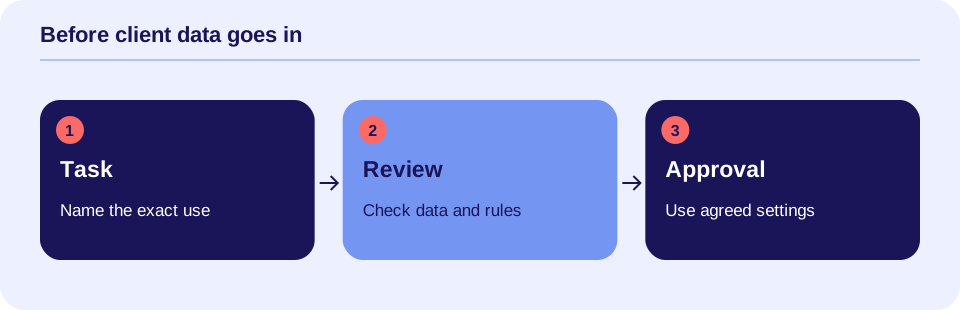
Before entering client information, find your team’s rule for that tool. The rule should name the account, task, allowed data, and reviewer. If there is no clear approval, pause and ask your privacy or security lead. In a solo practice, arrange the needed legal and technical review yourself.
Approval for a staff guide does not also approve care notes. Approval for one service or paid work account does not cover every product from the same company. Extra features, browser add-ons, and links to other apps may send data to other places.
For practice, use fully made-up cases or approved public text. Do not base a “made-up” case on a real client’s rare life events. You can learn to write clear requests without sending a client’s story.
Know what counts as client information
Names and birth dates are easy to spot. A note can also identify someone through a workplace, a small town, a date, or a rare event. Audio, images, message history, and attached files may contain private details too.
HIPAA is a U.S. law that protects certain health information. Protected health information, or PHI, is health data linked to a person within the scope of HIPAA. The law applies to covered organizations and their business associates; not every app or business is covered. HHS explains these roles in its cloud guidance.
Even when HIPAA does not apply, other laws, professional duties, contracts, and practice rules may still apply. Your review team should check those duties for your setting. An office task, such as billing, can involve private health data just as a care task can.
A BAA is one part of the review
A business associate agreement, or BAA, is a contract that sets duties for handling protected health data. HHS says that a cloud service handling electronic PHI on behalf of a covered organization is a business associate. These uses require a HIPAA-compliant BAA and other HIPAA safeguards. This can be true even when the service holds only encrypted data and cannot read it. HHS cloud guidance.
A BAA is not a seal of product approval. Your team still needs to review how the service works and whether the exact use is allowed. Ask which service and features the contract covers. Confirm who can see data, how long it stays, and how it is returned or deleted.
Turning off AI training is useful when required by your plan, but it does not settle every issue. Data may still be stored, logged, or seen by support staff. Check the full data path, not just one setting.
Removing a name is not enough
De-identification means changing data so it no longer identifies a person under the required standard. HIPAA has two methods: Expert Determination and Safe Harbor. The first uses a qualified expert’s assessment. The second has specific removal rules and a condition about what the organization knows. HHS de-identification guidance.
Replacing a name with “Client A” does not by itself meet either method. Details inside free text may still identify someone. A summary can carry those details forward.
For staff practice, fully invented examples are often easier to use than trying to strip a real record. For real data projects, have your review team choose and check the method. Do not ask an unapproved AI service to remove identifiers; sending the original record to it is already a data use that needs review.
Some records need extra care
HIPAA gives psychotherapy notes special protection. This is a defined type of note, kept separate from the medical record. It does not mean every therapy progress note. HHS says most uses or sharing of psychotherapy notes require the person’s authorization, with limited exceptions. Have your privacy or legal reviewer check the exact use before any such notes go into a tool. HHS guidance on mental health information.
Some substance use disorder records fall under 42 CFR Part 2, a separate federal privacy rule. It does not cover every mention of substance use. HHS explains which programs and records it covers and the updated rules. The 2024 rule required compliance by February 16, 2026. HHS Part 2 guide.
Your review should also check state law and other duties that apply. A general client consent form or a signed BAA does not settle all of these issues.
Use a clear approval path
Here is a practical process your team can adapt. These steps are suggested work habits, not a complete legal test.
- Name the task. State what the tool will do and where the result will go. Keep care tasks and office tasks clear.
- List the data. Include text, files, audio, logs, and results. Use the least data needed under the approved plan.
- Review the service. Privacy, legal, and IT reviewers check the contract, BAA where needed, settings, access, and other rules.
- Plan the client process. Set how staff explain use and handle notice, consent, and client choices under the rules that apply.
- Test and train. Start with invented data. Teach the allowed task, review steps, and how to report problems.
- Record approval. Name who approves, who checks results, and when the use will be reviewed again. Change approval when the tool or data use changes.
Use the existing data-handling worksheet to keep the data path clear. Before buying a service, use the 25-question purchasing checklist. These tools help organize the review; they do not prove legal compliance.
Three examples
These cases are made up and are not legal decisions about a real tool.
A staff handout: A therapist uses an approved chatbot to simplify a public office guide. No client data is entered. The therapist checks the draft against the guide before sharing it. This is a useful starting task within the approved scope.
A personal chatbot: A therapist wants to paste a real intake note into a personal account after removing the name. The practice has not approved it. The therapist pauses and uses a fully invented case for practice instead. The privacy team reviews the real use before it begins.
An approved note tool: A practice has reviewed a specific work account for one kind of progress-note draft. Staff use only the approved features and data. A therapist checks each draft before it enters the record. Adding session audio would be a new data use to review unless approval already covers it.
These examples show why “yes” or “no” belongs to a specific use, not a product name alone.
If information went into an unapproved tool
Stop sending more data. Tell the right privacy or security contact promptly through the approved channel. Record which service and account were used, what was sent, when it happened, and any sharing settings you know. Keep private details out of ordinary email or chat unless that channel is approved.
Follow your team’s instructions for preserving facts, limiting access, and seeking deletion. Do not assume that deleting a chat removes every copy or resolves the event. The review team should assess the facts and any duties to notify people or report the event. Not every event has the same legal result.
The goal is to contain the issue and learn from it. Staff need a clear reporting path that lets them act quickly.
Make safe use easy to follow
Give staff a short list of approved tools and tasks. Add plain rules for the data each one may receive. Keep the list where people work, and name someone who can answer questions.
Clear approval helps teams use AI with confidence. It can support better notes and less busywork without making staff guess about privacy. Protecting a client’s story is part of protecting the care relationship.
Check memory, recordings, and connected services
A chat’s visible history is only one part of data handling. Some products have memory across chats. They may also keep logs, uploaded files, or audio. Turning off memory does not establish that every stored copy is deleted. Check the exact account and contract. OpenAI’s memory guidance is one vendor example of how features and controls vary.
An API connects software to another service. An AI feature inside your usual record system may send data to an outside provider. Audio and images add more kinds of data to the path. Record each recipient, storage location, permitted use, and deletion process in the existing worksheet. Client consent alone does not replace the required privacy and security review.
AI-literacy additions reviewed October 11, 2026. See AI Terms for Care Teams for the related terms and examples.
Discuss consent for documentation
The AI Scribe Patient Consent template helps record the tool, data practices, and patient’s choice. Adapt it to your practice before use and discuss it with the patient.
Sources and scope
Sources checked October 3, 2026. This article is for learning and planning, not legal, clinical, or security advice. It does not decide whether a specific product or practice meets the law. Examples and approval steps are proposed practice ideas.
- HHS: Guidance on HIPAA & Cloud Computing. Covers business associate roles, BAAs, and safeguards.
- HHS: Guidance Regarding Methods for De-identification. Explains Expert Determination and Safe Harbor.
- HHS: Extra protections for mental health information. Explains psychotherapy notes and exceptions.
- HHS: Understanding Confidentiality of Substance Use Disorder Patient Records, or Part 2. Explains scope and the updated federal rule.