
A good AI tool can help you get a draft started. It can turn a long public guide into a short outline or help you make a staff handout easier to read. Used well, it may leave more time for the work that needs your full attention: listening, building trust, and helping people.
You do not need to become a computer expert to use it well. You do need to know what it does, what information it uses, and how to check its work. Those skills help you turn a quick draft into something you can trust for a clear purpose.
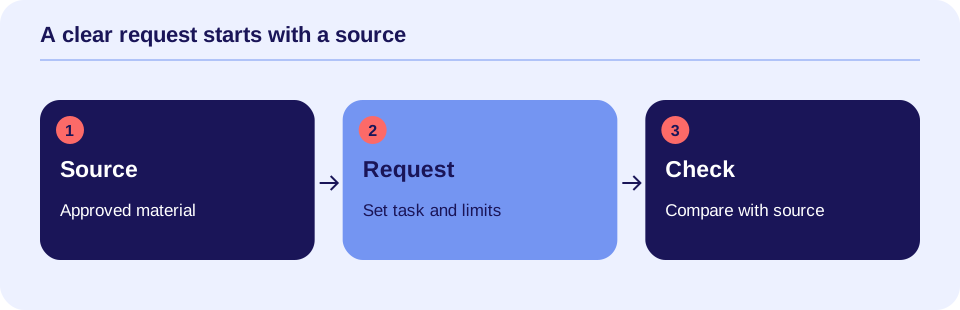
A useful draft starts with clear thinking.

What “generative” means
Generative AI creates content. That content may be text, sound, pictures, or video. A chatbot is one kind of tool. You type a request, called a prompt, and it writes a reply, called an output.
Many text tools use a large language model. This is a system trained on large amounts of data to learn patterns in language. It uses those patterns to build a reply. It can write in a warm voice or use clinical terms without knowing your client or having checked the facts.
The tool’s style is not proof of its accuracy. NIST, a U.S. standards agency, calls false or made-up AI content confabulation. People often call it an AI “hallucination.” It can include a wrong fact or a source that does not exist. See the NIST Generative AI Profile.
A draft can still be useful
Think of AI as help with a defined task. A blank page often takes more effort than a draft you can shape. You can ask a tool to organize approved points, shorten text, or suggest a few ways to explain an idea.
For example, you might ask it to turn a public office policy into a new-staff checklist. You then compare every step with the policy. The tool helps with the writing. The source remains the basis for the final guide.
This is different from asking it to decide a client’s diagnosis. A diagnosis depends on careful assessment, context, and trained judgment. Do not treat a general chatbot as a clinical decision-maker. A tool proposed for care decisions needs a review suited to that use.
All examples here are made up. They show ways to work, not results from a study or proof of a product’s benefit.
Know which kind of task you are doing
An office task supports the work around care. Drafting a meeting agenda from nonprivate points is one example. Another is making a public staff guide easier to read. These can be useful places to practice with an approved tool.
A care task affects a client’s care or record. Drafting a note, a client handout, or part of a care plan belongs here. The work needs checks for facts, clinical fit, and the client’s needs. An office task can also involve private data. A billing draft is still sensitive if it includes client details.
The boundary is not simply “writing versus treatment.” Look at what goes into the tool and what the result will be used for. A short letter can affect care, payment, or access to services.
Protect the information you enter
For practice, use made-up cases and approved public text. Do not put real client details in a chatbot just to learn how it works. Removing a name alone does not make a case safe to share. A story may still identify someone through dates, places, or rare events. Follow your team’s approved data rules.
HIPAA protects certain health data in the United States. HHS says that cloud services handling protected health data on behalf of a covered organization can be business associates. Those uses need a business associate agreement, or BAA, and other safeguards. A BAA is a contract that sets duties for protecting and using the data. See HHS guidance on cloud computing.
Your privacy, legal, and IT teams should review the exact service and use before client data goes in. They need to check the contract, settings, access, storage, and other rules that apply. Your work account and your personal account may have different terms. Use the approved account and settings, not just the same product name.
The data-handling worksheet helps your review team record those details. Therapists can then follow clear rules for each approved task.
Write a clear request
A useful prompt states the task, the source, and the limits. Long prompts are not always better. Give the tool enough detail to do one job.
Here is a sample prompt for an approved tool using public material:
“Use only the public office policy below. Make a one-page guide for new staff. Use short sentences and common words. Keep every required step. Do not add rules or contact details. Mark any unclear part for me to check.”
Add the approved source text after the request. Then check the result against it. The instruction to use only the source helps define the task; it does not guarantee that the tool will follow it.
A follow-up request can help revise the draft. For example: “Shorten the second paragraph without changing the rule.” After each change, check that the meaning stayed the same.
Practice with a made-up case
Suppose your team is building a worksheet for a fictional adult who feels tense before work. You ask an approved tool to draft a simple daily check-in page. The tool adds a diagnosis and tells the person to change a medication.
The useful next step is to remove those additions. They were not part of the task or supported by the case. Ask for a draft that stays within the approved teaching goal. Check the full new version, because fixing one line does not prove the rest is right.
A revised page might help someone record a feeling, a situation, and a coping step already discussed with their therapist. Before using it with a real client, the therapist must check whether it fits that person’s care, reading needs, and culture.
This example is about reviewing a draft. It is not treatment advice for a real person.
Check meaning, not just spelling
A polished draft can change a client’s story in subtle ways. “Client reports poor sleep” is different from “Client has insomnia.” The first records what the person said. The second may sound like a diagnosis. Keep those differences clear.
For any approved care draft, check the facts against the source. Check who said each point. Keep observations, client reports, and your own assessment distinct. Remove guesses presented as facts. Read for language that labels or judges the person unfairly.
For a client handout, also check whether the steps make sense for that person. A tool may assume access to a quiet home, free time, or a smartphone. Change the draft to fit real needs. If a translation is needed, use a qualified review process for that language and purpose.
These are suggested review habits. They do not replace your profession’s standards, your team’s policies, or rules for your setting.
Verify sources outside the chatbot
If the tool names a study, open the real source. Confirm that it exists and supports the claim. Check the date, the people studied, and what the study actually measured. A study about one group or tool does not prove the same result for all clients or products.
Do not rely on the chatbot to grade its own accuracy. Asking “Are you sure?” may lead to another confident answer. Compare the claim with trusted sources or the approved material you gave it.
If you cannot check a claim, leave it out of the final resource or hold the draft for review. Clear, supported text is more useful than a long answer with weak claims.
Keep review time in the plan
AI may speed up drafting and still create extra work. Count the time spent reading, fixing, and checking sources. Compare that with your usual process before deciding that the tool helps.
For a small trial, pick one approved task and one source. Keep client data out. Record draft time, review time, errors, and whether the final result is useful. Ask the staff who use it what feels easier and what feels harder.
The NIST AI Risk Management Framework offers voluntary guidance for checking AI use over time. It is not a law or a seal of product approval. Your team can use it to plan tests and name who is responsible.
Build confidence through practice.

Make the skill part of daily work
Before you start, confirm the tool, task, data, and reviewer are approved. Keep a clear way to report errors and pause use. Save the final work through your normal record or document process. Do not let a draft quietly become the official version.
If use affects a client visit, explain the role of the tool in plain words. Follow the notice and consent rules that apply. Make sure staff know the process when a client declines a tool that records or processes their information.
For leaders choosing a service, the 25-question purchasing checklist gives clear steps and proof to ask for. For a wider starting plan, read Responsible AI in Behavioral Health: A Practical Introduction.
Start with one useful skill
Try turning approved public text into a shorter guide. Give a clear request. Compare the draft with the source. Fix it, and count the full effort. This small task teaches the habits needed for more complex work.
The goal is not more AI use for its own sake. The goal is better care and work that feels more manageable. A tool earns its place when it helps you finish useful tasks and leaves more room for the human relationship at the center of therapy.
Know what the tool can use
A context window limits how much material a model can use for a reply. Tokens are the units used to count that material. An upload may be too long, or the service may select only parts. Ask how it handles long records. Check that key source facts reached the final draft.
Fine-tuning means extra training on selected examples. It differs from retrieval-augmented generation (RAG), which finds material for a reply. Neither label proves that a tool is fit for care. Ask about the data, the exact task, and the tests. A lower temperature setting may reduce variation; it cannot make an answer true. See the vendor’s model concepts and retrieval guidance for technical details.
AI-literacy additions reviewed October 11, 2026. See AI Terms for Care Teams for the related terms and examples.
Sources and scope
Sources checked October 3, 2026. This article is for learning, not clinical, legal, or security advice. The prompts, cases, and review steps are teaching examples. They are not clinical tests or proof that a tool improves care. Vendor sources in the added AI-literacy section explain features or research findings; they are not product endorsements or evidence of clinical benefit.
- NIST: Generative Artificial Intelligence Profile, AI 600-1, July 2024. Describes content errors and ways to manage generative AI use.
- NIST: AI Risk Management Framework, first released January 2023. Voluntary guidance for managing AI use. The NIST page notes that the framework is being revised.
- HHS: Guidance on HIPAA & Cloud Computing. Explains duties for covered organizations and cloud services handling protected health data.